
Wizard: Dialog
Wizard walkthrough · Core Studio 3.0 · Verified 2026-09-01
When to use it: you need a “post this journal?”-style confirmation or a parameter dialog with a class behind it — the standard F&O dialog pattern.
Size: M · Automatable: fully — Dialog is the most rule-constrained pattern, so the exact output shape is proven.
Prerequisites
- A custom model. If the dialog drives a process, know which fields the user
must supply (they become the dialog’s fields and the class’s
parmmethods).
Steps
- Basics — name (validated, collision-checked), model/module.
- Dialog flavor — Simple confirm / Parameter dialog / Progress.
- Fields — table editor: name, EDT type from the index, label.
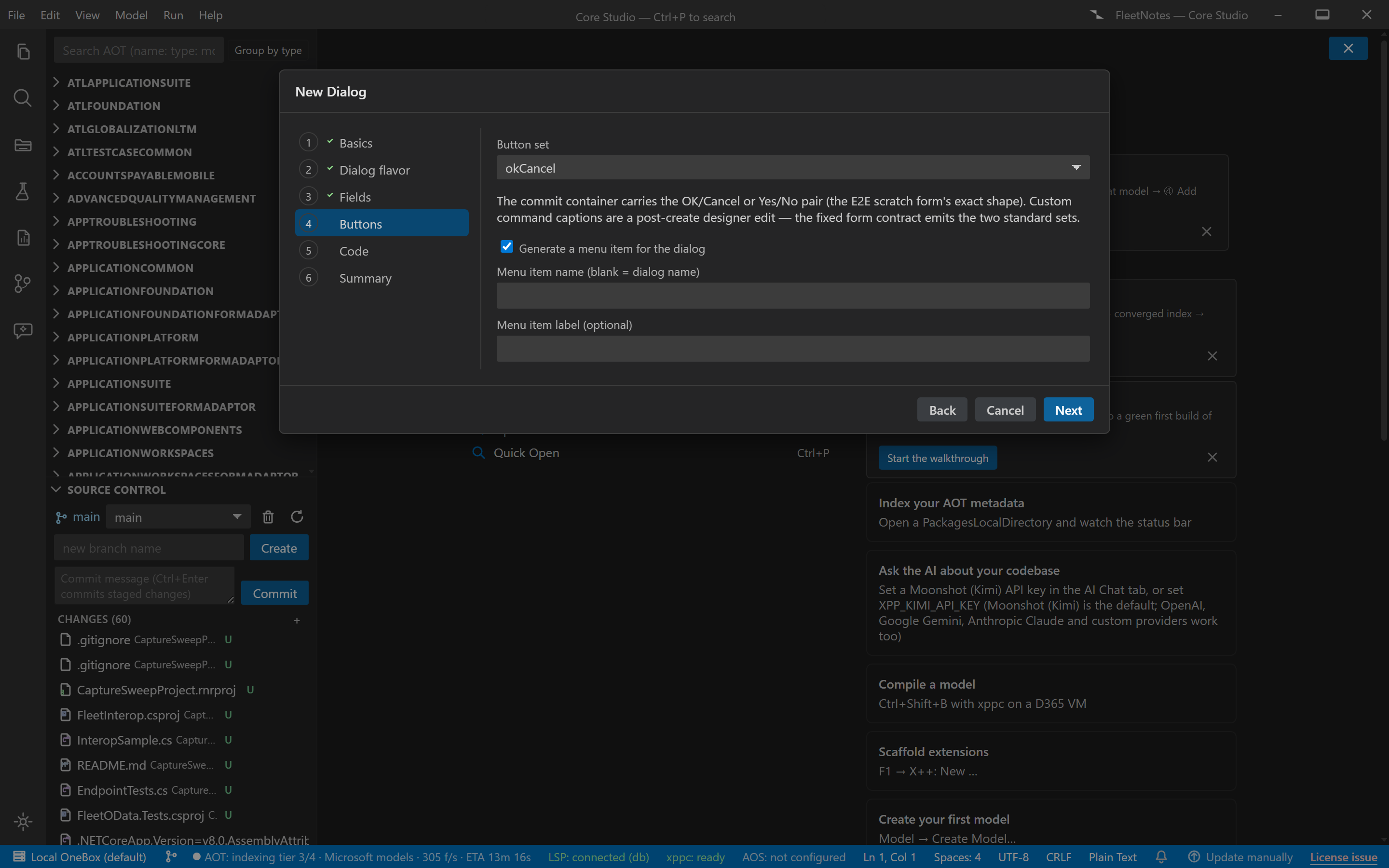
- Buttons — OK/Cancel (the default pair, with
SaveRecord=Noon Cancel), Yes/No, or custom command text. - Code — generate a RunBase-style controller class skeleton:
main,run, and aparmmethod per field. The generated X++ is validated with the language engine before it’s written. - Summary — AxForm + AxClass [+ menu item], previews, commit.
Output anatomy
AxForm/<YourDialog>.xml— Dialog-pattern form (content group WidthMode/HeightMode=SizeToAvailable; commit ButtonGroup SizeToAvailable).AxClass/<YourDialog>.xml— the controller skeleton withmain/run/parm.AxMenuItemAction/<YourDialog>.xml— if the menu item extra was selected.
Verify it worked
- The form passes Dialog 1.2 conformance with 0 errors and 0 warnings (the content group is present — the common hand-written mistake).
- The class parses with zero error nodes; on-VM compile 0/0.
- Run it: the dialog opens, your
parmmethods carry the entered values intorun.
If it goes wrong
- SysOperation vs RunBase — the wizard ships the RunBase-style skeleton (SysOperation is a follow-up). If your codebase standardizes on SysOperation, port the skeleton — the form needs no changes.
- Buttons don’t dismiss — check you didn’t hand-edit the command pair; the emitted OK/Cancel commands are the platform’s, not custom handlers.
Next: Class wizard for plain/runnable classes, or the dialog-driven flow in the first customization tutorial.