The first standalone, AI-native IDE for Microsoft Dynamics 365 F&O.
Core Studio
“First” — after an exhaustive review of the market · see the map
Build X++ with a development environment designed for the whole F&O system.
Core Studio brings code intelligence, guided creation, build and release workflows, and human-controlled AI into one focused workbench for Microsoft Dynamics 365 Finance & Operations.
Core Studio for Dynamics 365 F&O
Watch real workflows Explore Studio FeaturesThe trial and download lifecycle is being proven end-to-end. Watch the product in the demo; Contact Sales for evaluation access.
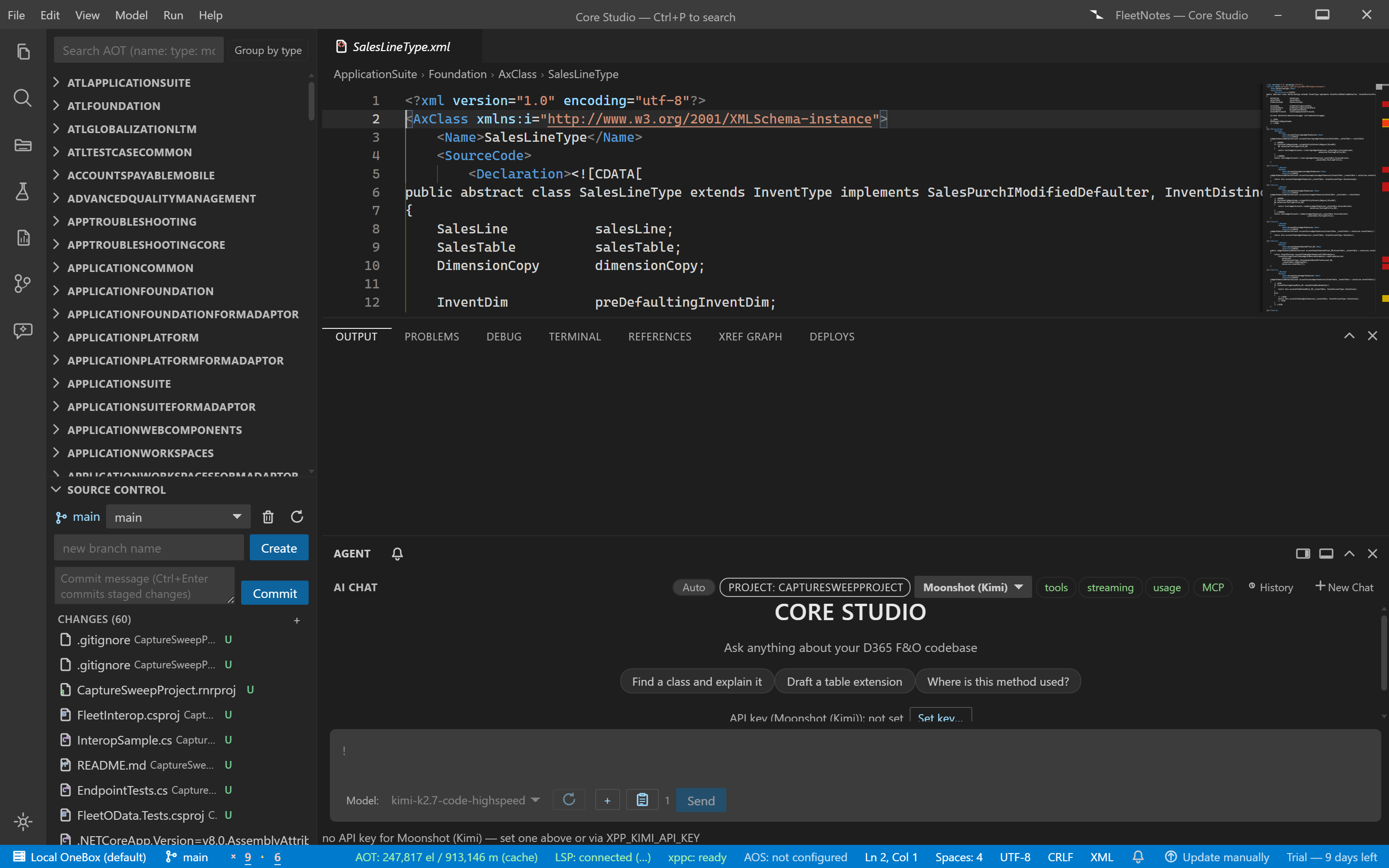
One workbench, four workflows.
Understand, change, verify, and get assistance — against the same indexed model of your F&O application.
Understand
A workspace-wide map of code and metadata: navigation, search, and the AOT explorer answer from the indexed application.
Change
Edit X++ with diagnostics as you type, or scaffold extension-first changes through guided wizards with review before build.
Verify
Run the Microsoft toolchain — compile, database sync, deployable package — and supported test workflows from one visible pipeline.
Assist
Governed AI reads the indexed workspace, proposes changes, and stops mutating actions at a human review gate.
The complete engineering loop.
Each stage names its tool, its output, and its failure state — streamed, not hidden.
-
Understand
Index the application catalog in tiers; early results are visibly partial while deeper tiers complete.
-
Edit
Diagnostics, hover, and cross-model navigation while you work; wizards scaffold into the correct model.
-
Build
Core invokes the supported Microsoft build components and streams the compile with an explicit verdict.
-
Test
Run supported .NET and X++ SysTest workflows; jump from a failure to its source.
-
Package
Produce a deployable package with the documented structure; validation stays with Microsoft's tooling.
-
Release
Generate CI pipeline artifacts for your Azure DevOps environment; release execution stays in your pipeline.
Measured on the real application catalog.
Internal certification measurements on a D365 development VM against the product's own prior baseline — engineering-progress numbers, not independent benchmarks.
16.7 s → 62–117 ms
Internal certification measurements on a D365 development VM against the product's own prior baseline — engineering-progress numbers, not independent benchmarks.
281–530 ms → 3–16 ms
Internal certification measurements on a D365 development VM against the product's own prior baseline — engineering-progress numbers, not independent benchmarks.
16.4 s → 13 ms
Internal certification measurements on a D365 development VM against the product's own prior baseline — engineering-progress numbers, not independent benchmarks.
Methodology: internal certification on a D365 development VM ↗
Works with the Microsoft platform.
Core Studio invokes supported Microsoft build and deployment components and targets Microsoft Dynamics 365 Finance & Operations environments.
Core Studio is an independent product for Microsoft Dynamics 365 Finance & Operations. It is not affiliated with, endorsed by, or sponsored by Microsoft. Microsoft and Dynamics 365 are trademarks of the Microsoft group of companies.
Studio Features.
Every listed capability is live in the current build and documented.
Build, sync, package, release
Run the Microsoft toolchain stages — compile, database sync, deployable package — from one visible pipeline.
Start a build; each stage streams its output and stops on failure.
C# companion projects
Build net48 interop libraries, net8 OData clients, and Azure Functions beside the F&O model.
Add a companion project; build, test, and debug it with the X++ workspace.
X++ editor and diagnostics
Edit X++ with diagnostics as you type, hover information, and cross-model navigation.
Open a class; diagnostics and hover resolve against the indexed metadata.
Environment profiles
Switch AOT roots between environments with per-profile state preserved.
Define profiles for local editing, OneBox, UDE, or CI roots.
Source control
Stage, commit, and inspect changes in the built-in Git panel.
Changed files group by status; stage and commit in place.
Global source search
Ranked search across names and source text with snippets, filters by name, type, model, and property.
Query by name or code text; results carry snippets and model scope.
Governed AI assistant
AI tools read indexed code and metadata, propose changes, and route mutating operations through an approval gate.
Ask for a change; mutating actions stop at a human review with a full preview.
Guided creation wizards
Scaffold tables, forms, classes, and more through extension-first wizards with review before build.
Pick a wizard, answer the steps, review the generated artifacts, then build.
Workspace-wide index
The application catalog is indexed in tiers so navigation, search, and AI tools answer from the real metadata.
Open a root; the index builds in tiers with partial results flagged while deeper tiers complete.
Report design
Edit SSRS report structure and layout with the rendering boundary stated: real data rendering happens against the target environment.
Open a report, edit its structure on the canvas, deploy and execute for rendering.
Test workflows
Run supported .NET and X++ SysTest workflows with one result model, history, and failed-test navigation.
Discover tests, run them, jump from a failure to its source.